
Iron Ear · Free plug-in
Furnace
A guitar effect for shoegaze and doomgaze: articulate direct drive, with a large, separately distorted reverb growing behind it.
Free. No account, no email, no telemetry.
Some sounds shouldn’t be polite.
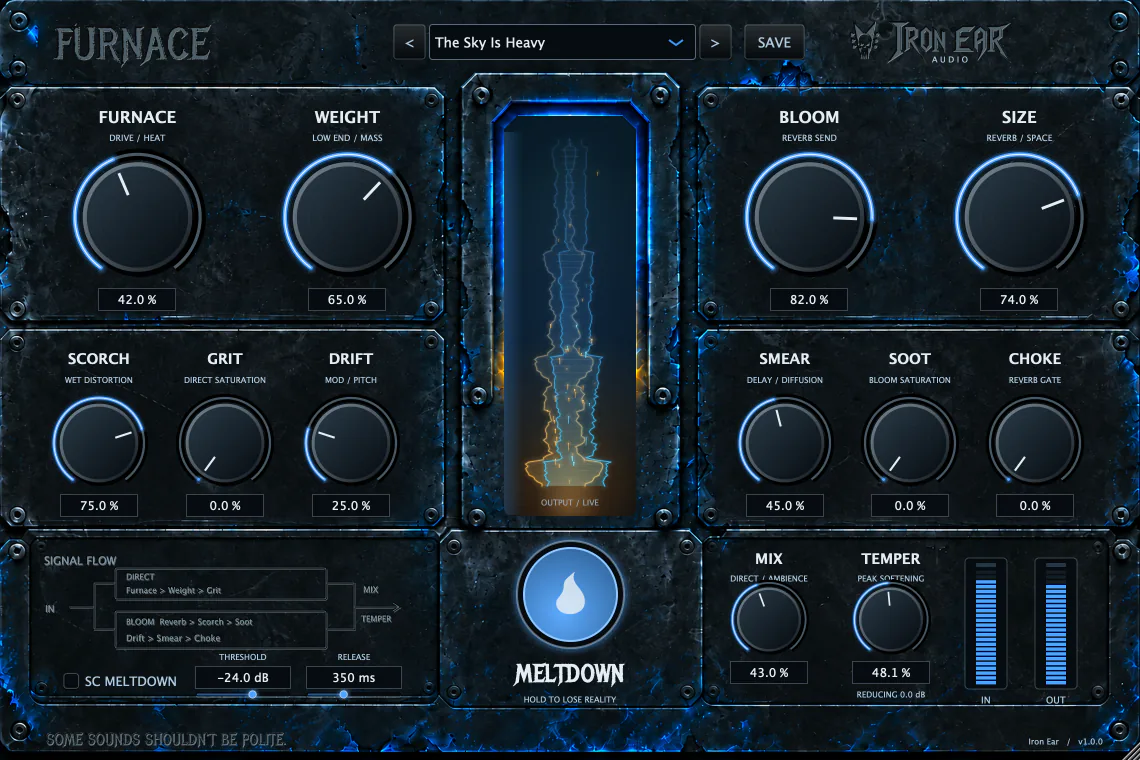
Furnace runs two paths at once. The direct path stays articulate: drive, low end and saturation that leave the pick attack intact. Behind it, the same signal is sent into a large reverb and that is distorted separately, so the space burns while the notes in front of it stay readable.
That split is the whole instrument. Keep Mix low and it is a shoegaze wash behind a guitar you can still hear. Open it up, wind on Scorch and Size, and it collapses into doomgaze.
Meltdown is the pedal inside the plug-in: hold it down and the wet path gains sustain, drive and movement for as long as you keep it there. Hold to lose reality. It can also be fired from a sidechain input, with its own Threshold and Release.
The lit column in the middle of the panel is an output visualiser — amber for the low end, blue for the body and air. It is showing you the output, not analysing your spectrum.
Thirteen ways to burn it
Twelve knobs and one button. Nothing is hidden in a menu.
| Control | What it does |
|---|---|
| Furnace | Direct drive. How hard the dry guitar is pushed before anything else happens. |
| Weight | Low end on the direct path. Neutral at 50% — below it thins out, above it gains mass. |
| Bloom | How much of the signal is sent into the reverb. |
| Size | The space itself, from a room to a decay that keeps going. |
| Scorch | Distortion on the reverb rather than on the guitar. This is the one that makes it doomgaze. |
| Drift | Stereo pitch movement across the ambience. |
| Smear | Diffusion of the wet path, from separate reflections to one continuous sheet. |
| Choke | Closes the ambience down when you stop playing, so chords stop piling up on each other. |
| Mix | The balance between the direct signal and the ambience. |
| Grit | Saturation on the direct path. |
| Soot | Saturation on the bloom path. |
| Temper | Softens the peaks on the way out. |
| Meltdown | Hold it for more wet sustain, drive and movement. It can also be triggered from a sidechain input, with Threshold and Release. |
Ten places to start
Factory presets, shipped with the installer.
- First Light
- The Sky Is Heavy
- Blue Monolith
- Ash Cathedral
- Cut the Light
- Glass Embers
- Rust Halo
- Slow Collapse
- Black Tide
- Cinder Room
You can save your own alongside them. They are written to ~/Library/Application Support/Iron Ear/Furnace/Presets, so they survive an update and you can back them up or move them to another machine yourself.
Get it running
- Run the installer. It puts the Audio Unit and the VST3 into the system plug-in folders — there is nothing to drag anywhere.
- If Logic was already open, quit and reopen it. Plug-ins are scanned at launch. In other VST3 hosts, rescan your plug-ins instead.
- On a guitar track, open Audio FX → Audio Units → Iron Ear → Furnace.
- Load the First Light preset and play something.
Two things worth knowing in the first five minutes. Keep Mix somewhere around 25–45% to start with — the pick attack is the thing you lose first, and it is the thing that makes the wash behind it read as a guitar. And Furnace does not model an amp or a cabinet, so leave your usual amp chain exactly where it is and put Furnace in the signal path with it.
What it needs
- Formats
- Audio Unit (Logic Pro, GarageBand, MainStage) and VST3 (Reaper, Ableton Live, Cubase, Bitwig, Studio One and other VST3 hosts).
- System
- macOS 12 or later.
- Processor
- Apple Silicon (M1 or later). Intel Macs are not supported.
- Windows
- macOS today. There is no Windows build.
- Price
- Free. No account, no email address, no licence key, no telemetry.
- Installer
Furnace-1.0.0-macOS.pkg— a notarized macOS package, 5.3 MB.
SHA-256 of the installer: 46337d694fa8d538b5ce03d9f4a4e7d251b4413c579fa719b28c751473d32623
Something not working?
support@iron-ear.comTell us your Mac, your macOS version and your host and we can usually answer in one reply. The support page covers where Furnace appears in Logic, rescanning VST3 hosts, where presets live and how to remove it.